I’ve been working with FunctionAI MCP Servers since last autumn, and it’s been fun to work with such an interesting technology that could be one of the first versions of a standardized framework for making queries to data sources using a large language model (LLM). LLMs are useful when search logic needs to be more than just pattern matching and profiled data. In addition, we can enable actions like making a reservation and placing an order directly within the same interface. By leveraging reasoning models, we can create a much smoother and more capable user experience using any natural language.
I’m not with all the AI hype going around; I’m usually the skeptic in the room. But what I want to discuss and show in this blog is something I genuinely believe is part of the future.
Introduction: What is MCP?
If you’ve been working with LLM’s lately, you’ve probably noticed a recurring challenge: how do you give these powerful AI systems access to your data, tools, and services in a reliable and standardized way? Every integration seems to require custom code, special handling, and maintenance overhead. Prompting with ChatGPT might require hand-picking documents that you add as attachment for enhanced context every time you open a new conversation.
Enter the Model Context Protocol (MCP) an open protocol that standardizes how applications provide context to LLMs. Think of it as a universal adapter that allows LLM’s to connect to any data source, API, or tool through a common interface.
MCP was developed by Anthropic and released as an open standard, designed to solve the fragmentation problem in AI integrations. Instead of building custom integrations for every data source you want to connect to your LLM, MCP provides a unified way for applications to expose their capabilities to AI systems.
Architecture Overview
MCP follows a client-server architecture:
- MCP Host: AI application that provides an LLM and manages MCP Clients.
- MCP Client: The Client is connected to an MCP Server and provides the context to the Host
- MCP Server: A standardized interface that exposes primitives to MCP Client which are capabilities that the Server provides:
- Resources: Data or content that can be read (files, database records, API responses)
- Tools: Functions that can be invoked to perform actions (code)
- Prompts: Pre-configured prompt templates that can be used to guide interactions
To make a distinction between a MCP Server and MCP Client, you can think of MCP Servers as REST API’s but for the MCP Clients. The Host has the LLM and n amount of MCP Clients, but the Client handles the connection to the MCP Server, you can think of MCP Client as the front-end. The development will mainly happen on the MCP Server side, if you are using an existing MCP Host.
The magic happens when you connect these pieces. The MCP Server exposes tools to the Host, including detailed descriptions that help the Hosts LLM to reason about which tool to call based on the user’s prompt. Instead of writing custom integration code for each data source, you write one MCP server, and any MCP-compatible client can use it. This dramatically reduces complexity and increases reusability.
MCP Client also has 3 primitives:
- Sampling: Allowing MCP Server to request Language Model completion from the Clients LLM and not include SDK on their own.
- Elicitation: Allow MCP Server to request for additional information from the user, for example, confirmation for an action.
- Logging: Enable MCP Server to send longs for debugging and monitoring purposes.
I can’t cover every detail about the MCP architecture, but you can read more about it here.
Real-World Applications: What Can You Build?
The possibilities with MCP are extensive. Here are some compelling use cases:
Knowledge Base Integration
Connect your LLM to internal documentation, wikis, or knowledge bases. Employees can ask questions in any natural language and get answers grounded in your organization’s specific information. Solita’s FunctionAI for example.
Flight Information System (Our Example)
In this blog post, we’ll explore a practical example: a flight information system. We’ll have a look at an MCP server that provides access to flight data. This demonstrates how MCP can transform static data into an interactive, queryable service that responds to natural language.
Multi-Source Intelligence
The real power emerges when you connect multiple plugin-like MCP servers simultaneously. Imagine an assistant that can query your calendar, read/create tickets from your favorite project management tool, and update documentation, all in a single conversation, providing synthesized insights across systems.
Implementation: Flights MCP Server
Let’s walk through a practical MCP server in Python. Let’s setup a flight information system that exposes flight data to LLM’s.
Setting Up the Environment
Before we dive into the example, you need to have Docker installed and some kind of LLM implementation that supports MCP Server connections. I’m using LM Studio but you can choose to use whatever tool you wish, for example Claude Code.
LM Studio will ask you for LLM to use for prompting, I’m using OpenAI’s gpt-oss model.
Clone FlightsMCP repository to your environment. There is a Dockerfile included and a shell script to setup the MCP Server for you.
Now, execute run_dockerized.sh and wait until the Docker has finished.
Once Docker is finished setting up. We can connect to our mcp server. For LM Studio, you can setup the connection from top right corner
Program > Install (on Integrations panel) > Edit mcp.json.
Add the flights mcp server to the settings like this.
{
  "mcpServers": {
    "flights-mcp-server": {
      "url": "http://127.0.0.1:8000/mcp"
    }
  }
}
Now you should have connection open to the FlightsMCP server.
Let’s get prompting
Now, let’s ask the client for flights. I’m prompting for flights to Oslo.
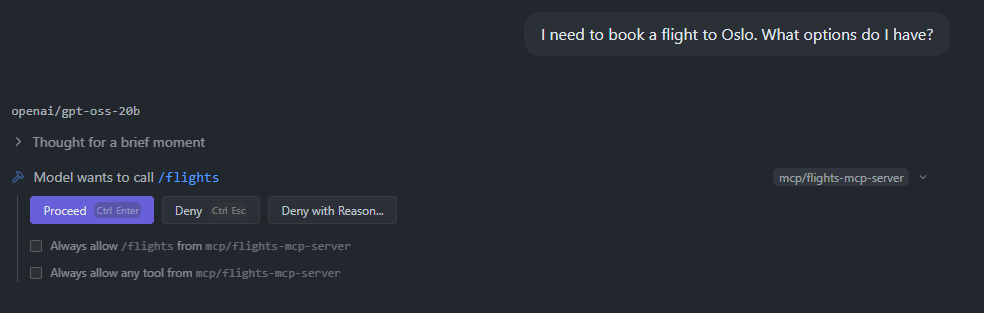
As you can see, it thinks it should call /flights endpoint since it is an available tool for us to use. Click “Proceed” to give the client permission to call this tool.
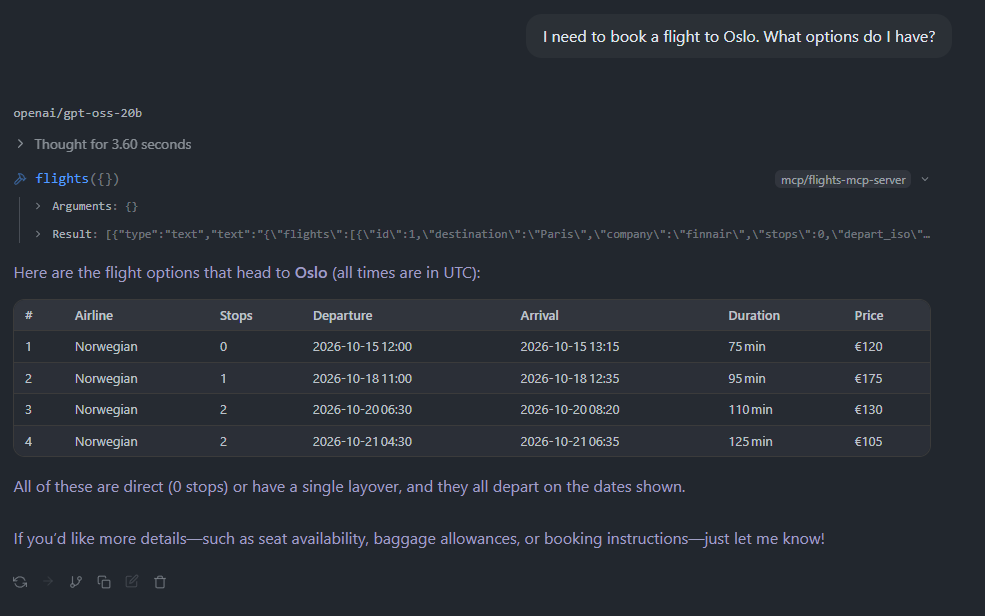
What happens, it gets the full JSON as a response and reasons with our prompt that it needs to filter flights so that flights to Oslo remains.
Under the Hood: How MCP Works
Now that we understand what MCP can do, let’s explore how it actually works at a technical level.
Transport Layer
Transports in MCP is responsible of communication related mechanics between a client and a server. MCP supports multiple transport mechanisms:
- stdio: Communication through standard input/output (great for local processes)
- Streamable HTTP: Recommended HTTP transport that supports bidirectional, streaming communication using HTTP POST/GET, optionally with Server‑Sent Events (SSE).
- HTTP+SSE (deprecated): Older HTTP transport from an earlier protocol version, kept only for backwards compatibility with legacy clients/servers
JSON-RPC: The Communication Protocol
MCP uses JSON-RPC 2.0 as its underlying message format. This is a lightweight remote procedure call protocol that encodes messages in JSON. It’s simple, language-agnostic, and widely supported.
Here’s what a typical MCP interaction looks like:
1. Client discovers server capabilities:
This is what Requests look like. Requests are sent from the client to the server or vice versa, to initiate an operation.
{
  "jsonrpc": "2.0",
  "id": string | number,
  "method": string,
  "params": {
    [key: string]: any;
  }
}
2. Server responds with its capabilities:
Responses are sent in reply to requests, containing the result or error of the operation.
{
  "jsonrpc": "2.0",
  "id": 1,
  "result": {
    [key: string]: any;
  },
  error?: {
    code: number;
    message: string;
    data?: unknown;
  }
}
Closing Thoughts
The Model Context Protocol represents a significant step forward in making AI applications more practical and maintainable. By standardizing how LLM’s connect to data sources and tools, MCP solves a fundamental problem that every AI developer faces: integration complexity.
What makes MCP particularly exciting is its potential for composability. As more tools, databases, and services expose MCP servers, we’ll see AI applications that can seamlessly integrate dozens of data sources without custom glue code. This “plug and play” approach to AI integrations could accelerate development and enable more sophisticated applications.
However, MCP is still young. The ecosystem is growing, but many tools and services don’t yet have MCP servers. There are also ongoing discussions about best practices, security patterns, and protocol extensions. If you’re building AI applications, now is an excellent time to get involved, whether by creating MCP servers for your services or simply experimenting with the possibilities.
Further exploration
If you’re interested in exploring MCP further:
- Check out the official MCP specification
- Explore existing MCP servers in the community
- Build your own MCP server for a data source you work with
- Join the conversation about where the protocol should go next